


How to Protect Your Facebook Account from Hackers

Samvel Martirosyan, media expert, reminds in his banman.am blog how to prevent a Facebook account from being hacked, as Azerbaijanis are rather active recently.
“As Azerbaijani hackers are actively breaking accounts of Armenian Facebook users, it’s worth introducing some tips to avoid unpleasant situation,”
a)Don’t click on everything like a woodpecker, attentively observe the picture, the link and comments. For instance, maybe it is a Youtube footage in the picture, but the link is quite different. If anything is suspicious, just bypass it.
Don’t install odd applications. They’d do anything without notifying you. Check and turn off all the apps.
b)Be very careful, the threat may come exactly from a friend.
And now protect your account,
1․ Attach you profile on a trusted e-mail. Better a Gmail. It’d be better to mention an alternative e-mail as well.
2.Passwords of the e-mail and Facebook should be different.
3.Let’s go to Facebook>>Settings>>Mobile and add your mobile phone. This will allow to securely use your phone.
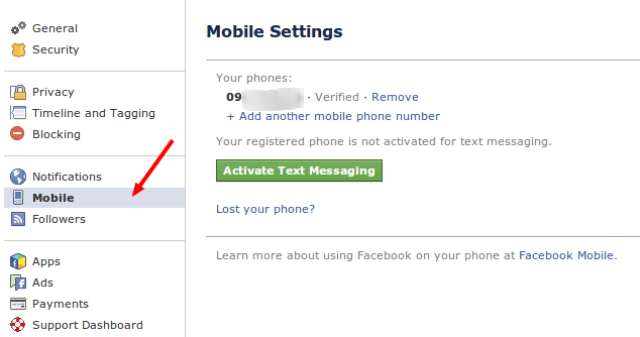
4.Now let’s visit Facebook Security section, which is available from the Settings section, or simply follow this link (you can trust me 🙂 )
Turn on secure browsing; this has nothing to do with Azerbaijanis, this will turn on https encryption and will help you to avoid possible typewriting from local places.
Login Notifications – if we turn this function on, if someone enters from other device, you profile will be logged in, and you’ll get a message, it’s up to you to decide, whether it’ll be an sms or an e-mail. Take into account that sms doesn’t include roaming tariff. Or you may choose both of them.
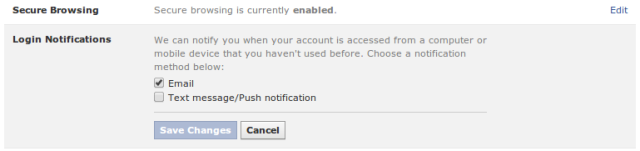
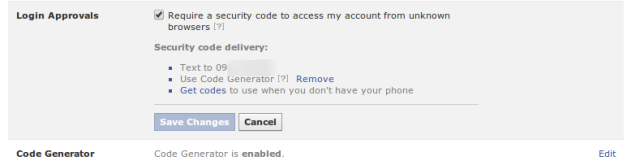
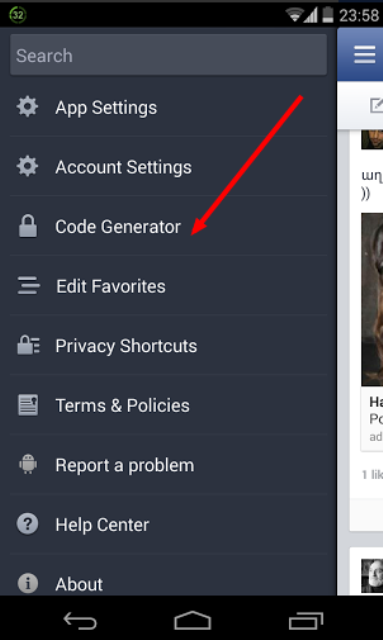
Now you may turn on Two-factor Authentication, which means, if anyone has your password, he/she can’t access without a special code. Turn on Login Approvals, after which every time to login with a new device, you should enter a special code as well. It will be sent via sms. Besides, if you leave for another country, you may click Get codes and have a few codes, which may be used after every entrance, each of them is burnt after use. If you have a smartphone on which Facebook app is available, there is an easier way. Turn on Code Generator, and you don’t have to wait for sms, the app generates a new code every minute.
And if your account has been broken and it didn’t help, follow this link and the steps.
Before that scan your laptop from viruses, if you’re out of luck and you use Windows 🙂